
Views: 186 Author: Site Editor Publish Time: 2026-01-04 Origin: Site


Understanding How an Infrared Pen Works in Modern Input Systems
Compatibility Factors That Determine Whether an Infrared Pen Will Perform as Expected
Accuracy Explained: Why Precision Matters When Using an Infrared Pen
The Role of Tip Design and Pressure Sensitivity in Precision Input
Wireless Performance, Latency, and Signal Stability Considerations
Power Systems and Rechargeable Design: Their Impact on Accuracy Over Time
Matching Use Scenarios with the Right Infrared Pen Specifications
Purchasing an Infrared Pen requires far more consideration than simply choosing a digital pointing tool. Compatibility and accuracy are the two defining pillars that determine whether the pen enhances productivity or becomes a source of frustration. In professional environments such as presentations, interactive displays, educational boards, and specialized Touchscreen Devices, even minor mismatches in infrared response or positional accuracy can disrupt workflow and reduce efficiency.
This article provides a focused, practical breakdown of what truly matters when evaluating an Infrared Pen, emphasizing how compatibility and accuracy work together, what technical features influence performance, and how buyers can make informed decisions without relying on brand names or marketing claims.
An Infrared Pen operates by emitting infrared light that is detected by sensors embedded in compatible display surfaces. Unlike capacitive pens, infrared-based input does not rely on electrical conductivity from the user’s hand, making it suitable for large-format interactive displays and specialized Touchscreen Devices.
Compatibility begins at the hardware level. The infrared wavelength emitted by the pen must align precisely with the sensor grid of the display. Even small deviations can lead to tracking delays, missed input points, or inconsistent cursor movement. This makes understanding the underlying infrared detection method essential when evaluating accuracy claims.
Accuracy in this context is defined by how precisely the system interprets the infrared signal’s position, angle, and timing. A Professional environment demands predictable and repeatable results, especially when the pen is used for annotations, fine selections, or controlled gestures. The more accurately the display reads the infrared signal, the closer the digital output aligns with the user’s physical intent.
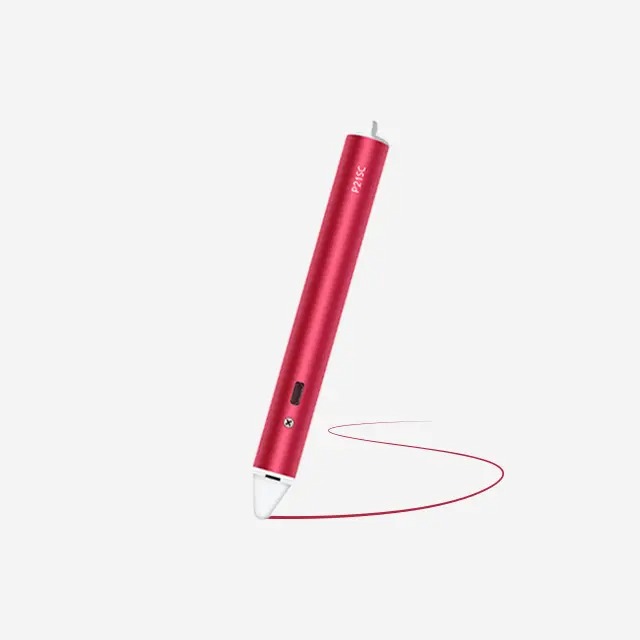
Compatibility is not a single checkbox; it is a multi-layered requirement involving hardware, firmware, and usage conditions. An Infrared Pen must be compatible with the infrared sensor resolution, refresh rate, and signal interpretation logic of the target display.
One critical factor is sensor density. Displays with higher sensor resolution can detect smaller positional changes, but only if the Precision Tip of the pen is designed to emit a focused infrared point. A mismatch here often leads to offset input, where the cursor appears slightly away from the pen tip.
Environmental compatibility also matters. Infrared systems can be affected by ambient lighting conditions. High levels of infrared noise from sunlight or certain lighting systems can reduce tracking stability. A well-designed Wireless infrared pen compensates for this through controlled emission strength and signal consistency.
The table below highlights key compatibility checkpoints buyers should evaluate:
| Compatibility Factor | Why It Matters | Impact on Accuracy |
|---|---|---|
| Infrared Wavelength Alignment | Ensures sensor recognition | Prevents missed input |
| Sensor Grid Resolution | Determines positional detail | Improves fine control |
| Display Refresh Rate | Affects tracking smoothness | Reduces lag |
| Environmental Interference Handling | Maintains signal clarity | Enhances stability |
Ignoring these elements often results in a pen that technically “works” but fails to deliver Professional-level performance.
Accuracy defines how faithfully an Infrared Pen translates physical movement into digital action. This includes point accuracy, line smoothness, and response consistency across the entire screen surface. Poor accuracy becomes most noticeable near screen edges or during slow, deliberate movements.
Precision is especially critical for tasks like diagram annotation, technical instruction, and detailed navigation on Touchscreen Devices. A pen with inconsistent infrared output may register jitter, unintended strokes, or broken lines. These issues are not only distracting but can undermine trust in the input system.
Another overlooked accuracy factor is calibration retention. High-quality infrared systems maintain accuracy over time without frequent recalibration. When calibration drifts, the pen may still function but lose alignment between the Precision Tip and the actual input point.
True accuracy is the result of stable infrared emission, reliable sensor interpretation, and consistent signal timing. Buyers should prioritize measurable performance characteristics over generic accuracy claims.
The physical design of the pen tip directly influences accuracy. A Precision Tip concentrates the infrared signal into a defined point, reducing ambiguity when the display interprets the input location. Wider or poorly shaped tips scatter infrared light, decreasing positional certainty.
While traditional infrared systems do not always support pressure detection, newer designs increasingly incorporate Pressure Sensitivity through signal modulation or supplementary sensors. When available, pressure sensitivity enhances control by allowing variations in line thickness or interaction depth, particularly useful in Professional annotation and instructional contexts.
Tip durability also affects long-term accuracy. Wear can alter the emission angle or intensity, leading to subtle but cumulative errors. Buyers should consider tip materials and replacement options when evaluating an Infrared Pen for sustained use.
Most modern Infrared Pen designs are Wireless, relying on internal power sources and self-contained emitters. Wireless freedom improves usability, but it introduces new accuracy variables such as signal latency and transmission stability.
Latency occurs when there is a delay between pen movement and on-screen response. Even minimal delays can disrupt hand-eye coordination during precise tasks. Stable wireless emission ensures that the infrared signal reaches the display sensors without fluctuation, maintaining consistent tracking.
Interference management is another key aspect. A well-engineered Wireless infrared pen minimizes cross-talk with other infrared sources and maintains consistent output strength regardless of orientation or distance from the display.
For accuracy-focused buyers, wireless performance should be evaluated not only on range but also on responsiveness under real-world conditions.

Power consistency plays a surprisingly important role in accuracy. A Rechargeable Infrared Pen must deliver stable voltage to maintain consistent infrared emission strength. As battery levels drop, poorly regulated systems may exhibit reduced signal clarity, leading to intermittent tracking errors.
Rechargeable designs offer long-term convenience and environmental benefits, but they must include proper power management to preserve accuracy throughout the discharge cycle. Sudden drops in performance are unacceptable in Professional settings where reliability is essential.
Charging methods also matter. Overcharging or inconsistent charging cycles can degrade battery health, indirectly affecting infrared output stability. Buyers should look for designs that balance convenience with long-term performance consistency.
Choosing the right Infrared Pen is ultimately about aligning compatibility and accuracy with real-world usage requirements. A pen that matches the display’s infrared sensing architecture, maintains precise signal emission, and delivers consistent performance across environments will significantly outperform generic alternatives.
Accuracy is not defined by a single feature but by the interaction between Precision Tip design, wireless stability, power management, and system compatibility. By focusing on these practical criteria rather than surface-level specifications, buyers can confidently select an Infrared Pen that delivers reliable, Professional-grade results across a wide range of Touchscreen Devices.
1.What makes an Infrared Pen compatible with a display?
Compatibility depends on infrared wavelength alignment, sensor grid resolution, and how the display interprets infrared input signals.
2.Does wireless design affect accuracy?
Yes. A Wireless Infrared Pen must maintain stable signal emission and low latency to preserve accurate tracking.
3.Is pressure sensitivity important for infrared pens?
When available, Pressure Sensitivity enhances control and precision, especially for annotation and detailed input tasks.
4.How does battery level influence accuracy?
In a Rechargeable infrared pen, unstable power output at low battery levels can reduce signal clarity and tracking reliability.
5.Why is tip design so critical?
A well-designed Precision Tip focuses the infrared signal, improving positional accuracy and reducing input ambiguity.


