
Views: 0 Author: Site Editor Publish Time: 2025-12-26 Origin: Site


In today’s digital age, interactive projectors have revolutionized how classrooms, offices, and even retail spaces engage with digital content. Unlike traditional projectors, interactive projectors turn any surface into a touch-enabled display, allowing users to interact with content directly. Whether you're in education, business, or retail, selecting the right interactive projector is key to enhancing collaboration, engagement, and productivity. In this comprehensive buying guide, we’ll walk you through the essential features to consider when choosing an interactive projector, helping you make an informed decision that suits your needs.
When it comes to displaying content, traditional projectors have long been the standard. However, they are limited in terms of interactivity. Traditional projectors simply display content, requiring users to interact with it through separate devices like keyboards or mice.
In contrast, an interactive projector enables users to interact with the projected content directly using touch gestures or a specialized pen. This real-time interaction brings numerous benefits, including:
Enhanced Engagement: With the ability to interact directly with the content, users are more involved and engaged, whether in a classroom or business presentation.
Collaborative Learning: Interactive projectors enable students to work together on projected content, making lessons more collaborative and interactive.
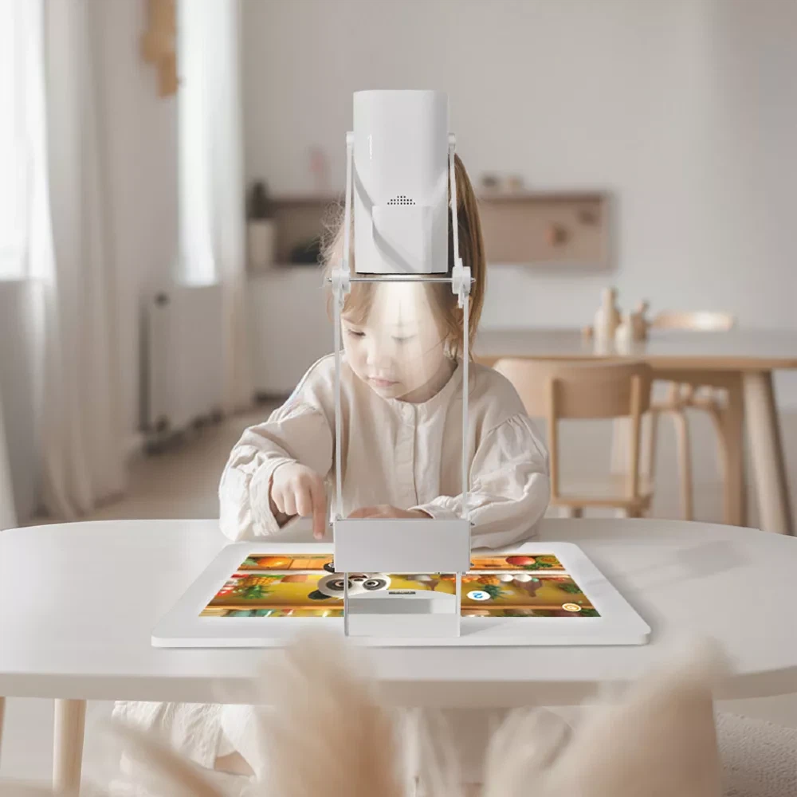
Versatility: Interactive projectors can be used on any flat surface, turning walls, tables, and even floors into dynamic touchscreens for various applications.
Choosing an interactive projector over a traditional display gives users the ability to interact with digital content in a more hands-on, immersive way, making it a powerful tool for learning, presentation, and communication.
One of the most important features of an interactive projector is the precision touch and tracking system. This technology allows users to interact with the projected content with accuracy and responsiveness.
Infrared Tracking vs Other Technologies: Interactive projectors typically use infrared (IR) sensors to track touch input. Unlike other technologies such as resistive or capacitive touch, infrared tracking provides a more precise and responsive experience. Infrared sensors emit invisible light across the projection area, and the projector’s camera detects any touch or gesture through the reflection of this light. This makes the interaction smooth and accurate, without any latency.
Real-time Response: The accuracy of the touch and the camera-based tracking ensures that the interaction is immediate, which is crucial for applications requiring fast responses, such as education or business meetings.
By using camera-based position tracking, our projectors are capable of tracking multiple touch points simultaneously, allowing for more dynamic and collaborative interactions. This feature makes interactive projectors particularly suitable for environments where multiple users need to interact with the content at the same time.
Setting up an interactive projector should be simple and quick. One of the major advantages of interactive projectors is their ease of calibration and setup, which is crucial for both classroom and business environments where time is of the essence.
4-Click Calibration Advantage: Tallpic's interactive projectors are designed with ease in mind. With our advanced transformation algorithm, users can calibrate the projector in just four clicks. This eliminates the need for complicated setups or technical know-how, making it accessible to everyone — even those who are not tech-savvy.
This simple calibration process ensures that the projector can be up and running in no time, allowing you to focus on the content, rather than spending time on technical adjustments.
An important consideration when purchasing an interactive projector is its connectivity options. A good projector should be compatible with various devices and media to enhance its usability.
Wireless Dongle and Notebook Integration: Our interactive projectors come with a wireless dongle that allows you to connect your projector to your notebook wirelessly. This means that there are no cumbersome cables to manage, making your setup cleaner and more flexible. Whether you're using a laptop, tablet, or mobile device, the projector supports seamless connectivity without any hassle.
Wireless capabilities provide the added benefit of mobility, as users are no longer tied to a specific location to control or interact with the projector. This is particularly useful in meeting rooms or classrooms, where the presenter may want to move freely without losing control of the content.
The projection size and resolution of an interactive projector play a vital role in the quality of the displayed content. The ideal projection size and resolution depend on your specific use case and environment.
Ideal Ranges for Various Scenarios: Interactive projectors can display content on a wide range of surfaces, from small whiteboards to large walls. The projection size can typically range from 40 inches to over 100 inches, offering flexibility depending on the room size and usage. For larger rooms, projectors with longer throw distances are ideal, while ultra-short throw projectors can provide large images even in smaller spaces.
High Definition Resolution: To ensure that the content is sharp and clear, look for interactive projectors with high definition (HD) or even 4K resolution. Higher resolutions provide clearer images, which is essential when displaying fine details such as diagrams, images, or text. This is especially important in educational and professional environments where visual clarity is crucial.
Interactive projectors with these features allow users to display crisp, high-quality content, making them ideal for detailed presentations and classroom learning.
When it comes to interacting with the projected content, the choice between using a pen or finger input can make a significant difference in user experience.
When to Choose High-Sensitivity IR Pens: Interactive projectors often come with high-sensitivity IR pens that are designed to provide precise input, even on large projection surfaces. The advantage of using a pen over fingers is the increased accuracy and control, especially for tasks like writing, drawing, or selecting small details in the content. This makes IR pens an excellent choice for educational settings where students need to interact with the projected material precisely.
Finger Interaction for Quick Tasks: For more casual use or quick interactions, finger-based input can be more intuitive. The versatility of interactive projectors allows users to switch between pen and finger input based on their needs, giving them flexibility in how they interact with the projected content.
When choosing an interactive projector, it's important to consider the budget and total cost of ownership (TCO). While interactive projectors are often an investment upfront, they provide significant value over time.
Total Cost of Ownership: Interactive projectors generally have a higher initial purchase cost than traditional projectors, but their ability to engage users and enhance productivity can lead to a higher return on investment (ROI). Factors to consider in the TCO include installation costs, maintenance, and potential savings from eliminating the need for additional equipment like touch screens.
Additionally, the long-term durability of interactive projectors and their low maintenance requirements can help offset the initial cost, providing years of reliable use for educational institutions, businesses, and other environments.
Selecting the right interactive projector requires a careful assessment of your specific needs and use cases. Whether you're looking to enhance classroom learning, improve business presentations, or create immersive retail displays, the features discussed above will help you make an informed decision.
By focusing on key features like precision touch and tracking, easy calibration, wireless connectivity, and high-resolution projections, you can ensure that your interactive projector meets your requirements and provides maximum value. At Tallpic, we are committed to providing cutting-edge interactive projector technology that is easy to use, efficient, and built to last. Contact us today to explore our full range of interactive projectors and discover how they can transform your learning or business environment.
What is the difference between an interactive projector and a traditional projector?
An interactive projector allows users to interact with the projected content directly using touch or pens, while traditional projectors only display content without any interaction.
Can interactive projectors be used in large classrooms or meeting rooms?
Yes, interactive projectors come in various sizes and throw distances, making them suitable for both small and large spaces.
Are interactive projectors easy to set up?
Yes, many interactive projectors, including those from Tallpic, offer easy setup with just a few clicks for calibration, and some models support wireless connectivity for a more flexible setup.
How does the interactive pen work with the projector?
The interactive pen is used to interact with the projected content, offering precise input for tasks like writing, drawing, and selecting items. The pen works with the infrared sensor system of the projector for accurate touch tracking.


